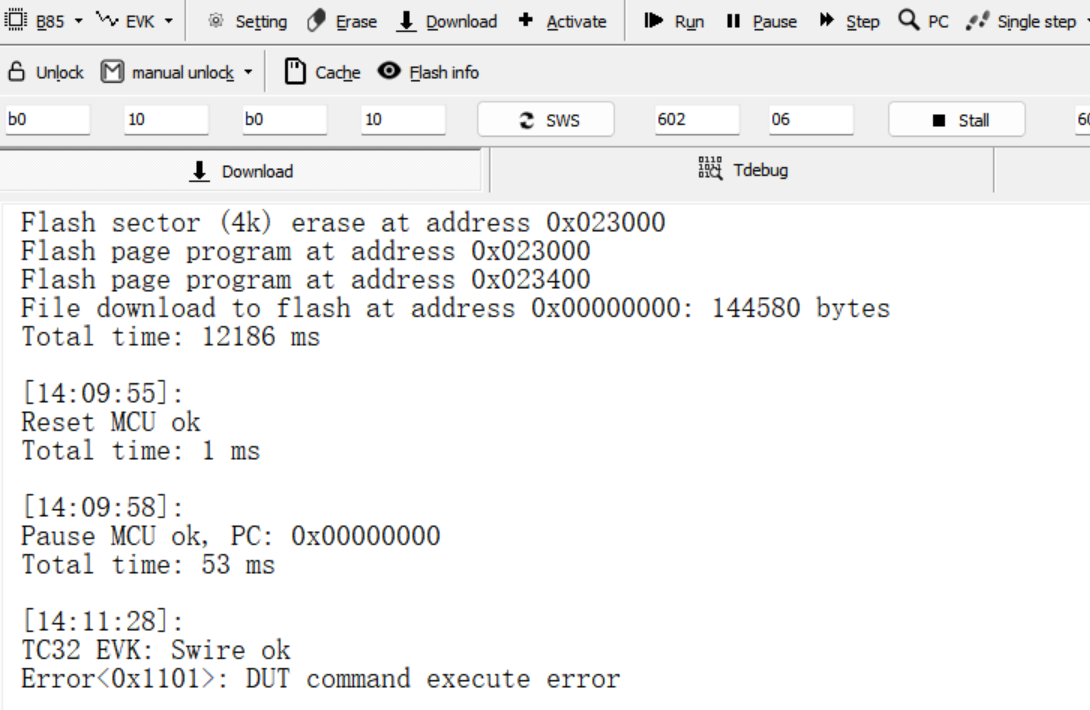
I was trying to Flash Zigbee firmware to 2 devices. First devicce flashed OK - as you can see from the picture below. But the second came out with and error: DUT command execute error - also can be seen on the picture. BDT version is 5.8.4
The board is working OK now.
I don't know what fixed it.
After trying next day and pressing different buttons, trying to erase, download and finally somehow it started working again. I was able to erase and download.
TL_SP 发表于 2025-11-21 09:27
Normally, you simply click "Activate" and then "Download". The Activate function is capable of resol ...
I know and I have been trying it many times. I have been using Telink chips for many years now.
The only reason that I needed to to click "Activate" was because the device was programmed with "end device" firmware.
As you could see from the picture in my first post at [14:11:28] that's where I pressed "download" button.
What does this error mean - "DUT execute command error"? Could you please explain.
In one of the previous versions of BDT that I tried as well, the error description was someting about "sram ..." - I can't remeber exactly
This issue occurs when the programmer sends a command to the DUT, but the DUT does not respond, resulting in an exception. To eliminate the impact of the firmware already running on the DUT during the download process, it is generally recommended that users click "Activate" before initiating the download.
TL_SP 发表于 2025-12-4 09:23
This issue occurs when the programmer sends a command to the DUT, but the DUT does not respond, resu ...
Thank you.
Although in my case I don't know what fixed the problem, because pressing "Activate" a couple of times didn't fix it. And in the end I don't know what did.
 关注公众号
关注公众号 沪公网安备31011502403548号
 English
 简体中文
简体中文


 发表于 2025-11-19 12:44:00
 发表于 2025-11-21 09:26:46
 发表于 2025-11-21 09:27:28